You depend on clear, consistent labels to keep projects, inventory, and workspaces running smoothly. This roundup cuts through the clutter so you can pick a label maker that fits how you work, whether you need durable tapes for a shop, a compact Bluetooth unit for on-the-go labeling, or a heavy-duty business machine that connects to your workflows.
Expect choices that save time, reduce errors, and make your systems easier to maintain.
Top Picks
|
Category |
Product |
Score |
|---|---|---|
|
🚀 Best Mobile |
85/100 |
|
|
💼 Best Office |
90/100 |
|
|
🎨 Best Color Labels |
78/100 |
|
|
⭐ Best All-Purpose |
88/100 |
|
|
💰 Best Bundle |
82/100 |
|
|
🏷️ Best Durable |
86/100 |
|
|
📡 Best Connected |
92/100 |
|
|
🎨 Best Embossed |
60/100 |
|
|
🔧 Best Industrial |
89/100 |
Selection Criteria
You want a tool that matches how you work, so we prioritized practical factors that matter day to day. We looked at ease of use so you can create labels quickly, materials and tape durability so labels survive the environments you work in, and connectivity options when you need app control or PC integration.
We weighed cost and tape availability because consumables determine long-term value, and we highlighted specialized features like heat-shrink capability, embossed styling, or wide-format printing when those solve specific professional needs. Each pick balances reliability, running costs, and the real workflows you use.
🚀 Best Mobile

Nelko P21
You get a pocket-friendly label maker that leans on your phone for design power. Pair it via Bluetooth, pick a template in the app, and you can print small, waterproof thermal labels for bins, cords, travel kits, and classroom supplies. It’s built for quick, everyday labeling rather than bulk office runs, so if you want something lightweight and fuss‑free you’ll appreciate how little space it takes and how simple the workflow is.
The device handles QR codes and simple images, so you can go beyond plain text when you need to.
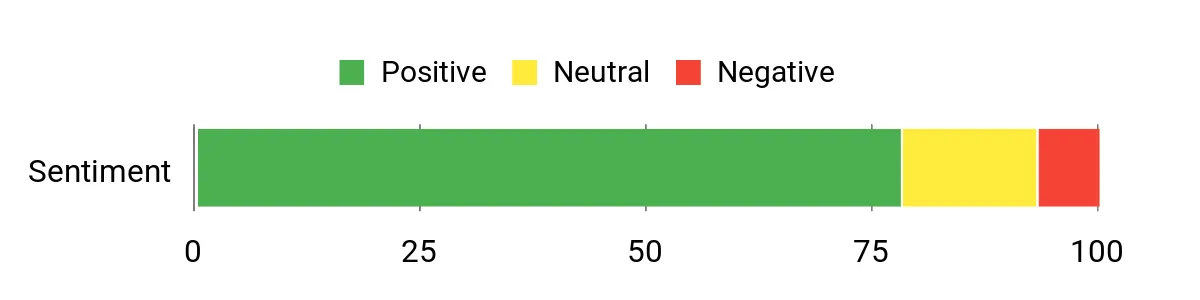
What People Say
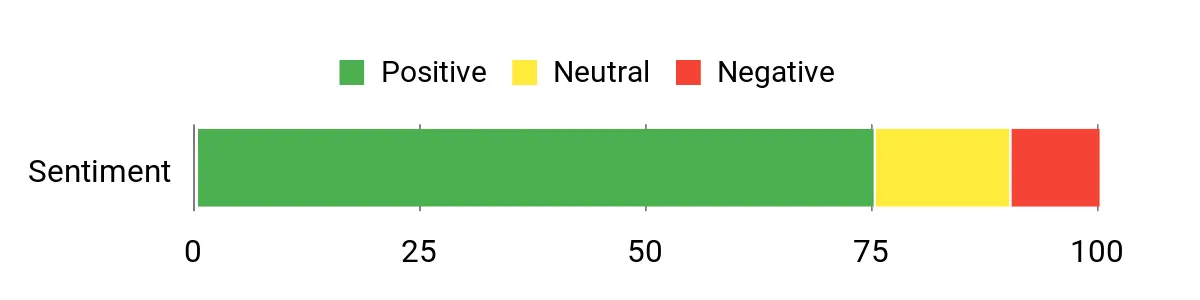
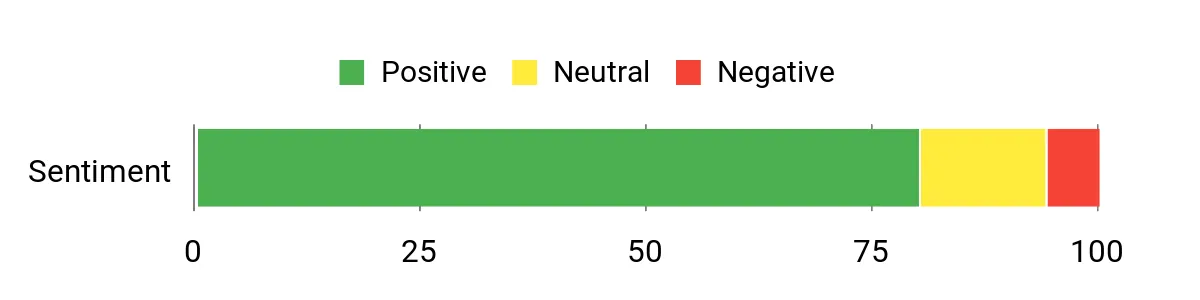
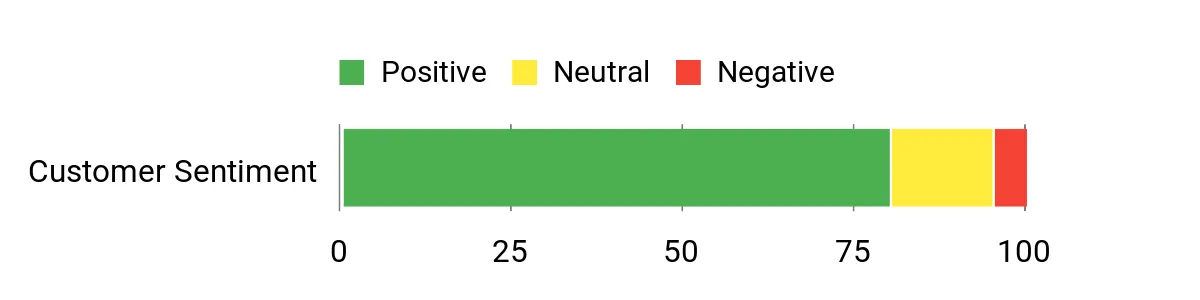
Customers often highlight how easy it is to pair the unit with a smartphone and create labels quickly using built-in templates. People praise the compact size and clear thermal print for pantry bins, cords, and small containers, while noting the machine is best for small-format labels rather than wide signage.
Overall Sentiment: Positive
Use Cases
|
Situation |
How It Helps |
|---|---|
|
Classroom Organization |
You can label student cubbies, supply tubs, and lesson materials quickly from your phone and carry the unit between rooms without extra gear. |
|
Home Pantry and Storage |
Waterproof thermal labels hold up on jars and tubs so you avoid faded handwriting and keep food and supplies easy to find. |
|
On-the-Go Services |
If you run pop-up events or mobile services, the rechargeable, pocket‑size design makes it simple to print name tags, price tags, or small product labels wherever you are. |
Time Savings
The app’s templates and the ability to save designs cut minutes off repeated tasks, and thermal printing is fast enough for quick batches so you don’t get bogged down fiddling with settings.
Ease Of Use
|
Feature |
Ease Level |
|---|---|
|
Setup & Pairing |
Easy |
|
Template Editing |
Easy |
|
Loading Tape |
Moderate |
|
Daily Printing |
Easy |
Versatility
You can print labels in several small sizes, add simple graphics or QR codes from the app, and switch between labeling tasks from school to office to travel needs. Expect great results for small-format needs but not for large or wide labels.
Practicality
The thermal, inkless printing and USB‑C recharge make this a low-maintenance tool you can stash in a drawer or bag. Replacement rolls are common, and the waterproof labels mean your work lasts through everyday wear and moisture.
Customization
|
Feature |
Customization Level |
|---|---|
|
Fonts & Sizes |
Good |
|
Templates & Frames |
Strong |
|
Images & QR Codes |
Basic |
|
Label Lengths |
Limited |
Key Benefits
-
True portability for on-the-go labeling
-
Simple phone app with ready templates
-
Thermal, waterproof labels that resist smudging
-
USB‑C recharge means fewer battery hassles
💼 Best Office

Brother PTD210
You get a straightforward, standalone label maker that’s built for routine office and home tasks. It has a clear keyboard, one‑touch formatting, and a bundle of laminated TZe tapes that stick through freezer, microwave, and dishwasher cycles. It’s the sort of tool you hand to a teammate and they’re ready to label files, shelves, or supplies without a tutorial.
If you want dependable, professional-looking labels without a phone or computer, this is a very practical pick.
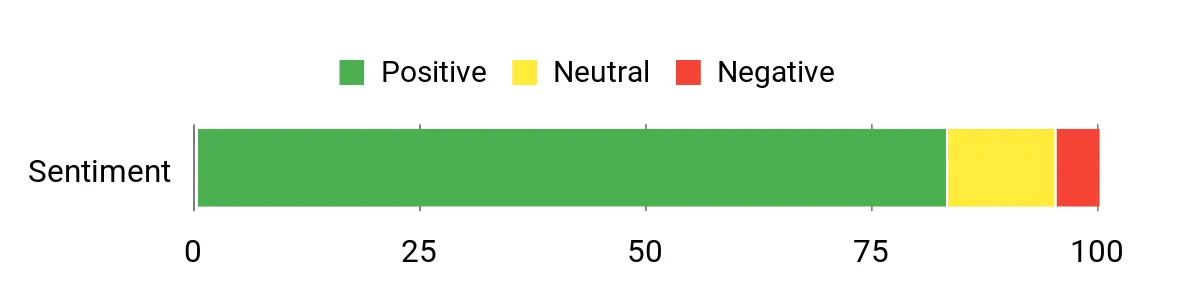
What People Say
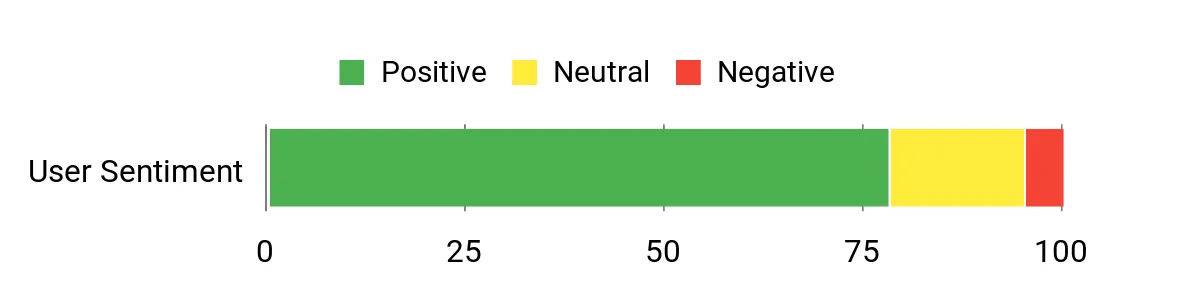
People frequently note how reliable and easy the PTD210 is for everyday labeling. Customers appreciate the durable laminated tapes and the straightforward controls that make fast, neat labels for files, storage, and kitchen use.
Many mention that the unit feels solid and is ready to hand off to others on your team.
Overall Sentiment: Positive
Use Cases
|
Situation |
How It Helps |
|---|---|
|
Filing and Archives |
Creates crisp, durable folder and shelf labels so you can find documents quickly and keep filing consistent across the office. |
|
Kitchen and Storage |
Laminated tapes resist moisture and heat, so labels on containers or freezer bags remain legible over time. |
|
Team Use |
Simple controls let anyone on your team produce uniform labels, reducing mislabeling and speeding up projects. |
Time Savings
Preloaded templates, quick formatting keys, and the ability to store common labels cut repetitive tasks down so you spend less time designing and more time organizing.
Ease Of Use
|
Feature |
Ease Level |
|---|---|
|
Setup |
Easy |
|
Formatting & Templates |
Easy |
|
Tape Replacement |
Moderate |
|
Printing & Cutting |
Easy |
Versatility
Handles a range of everyday tasks—file labels, cable tags, pantry jars, and small signage—with several tape widths and a variety of fonts and frames to match different needs.
Practicality
Because it’s battery powered and compact, you can tuck it in a drawer or carry it between rooms; genuine TZe tapes are widely available so refills are straightforward.
Customization
|
Feature |
Customization Level |
|---|---|
|
Fonts & Sizes |
Good |
|
Frames & Symbols |
Strong |
|
Tape Widths |
Good |
|
Memory Slots |
Basic |
Key Benefits
-
Standalone unit that runs without a phone
-
Durable laminated tapes for long-lasting labels
-
Simple controls so anyone can use it
-
Multiple tape widths and styles for varied tasks
🎨 Best Color Labels
Brother PT-N10
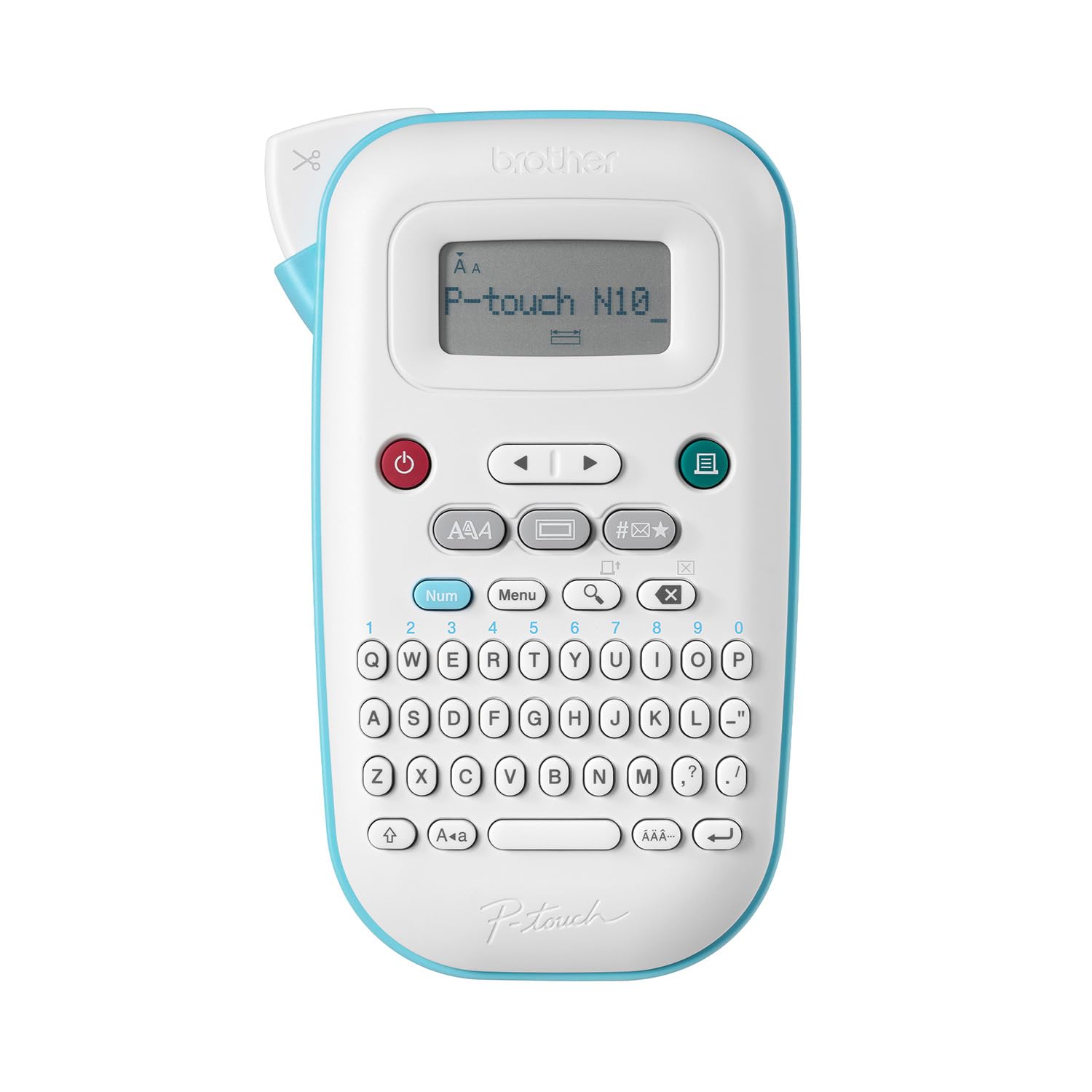
You get a compact, color-capable labeler that’s built around personal expression. Load a Btag tape, type on the QWERTY keyboard and preview text on the display before you print, which makes it easy to create eye-catching tags for school, crafts, and everyday organization.
It’s meant for smaller runs and colorful labels rather than high-volume production, so it fits well if you want labels that stand out or help items travel home with kids and customers.
What People Say
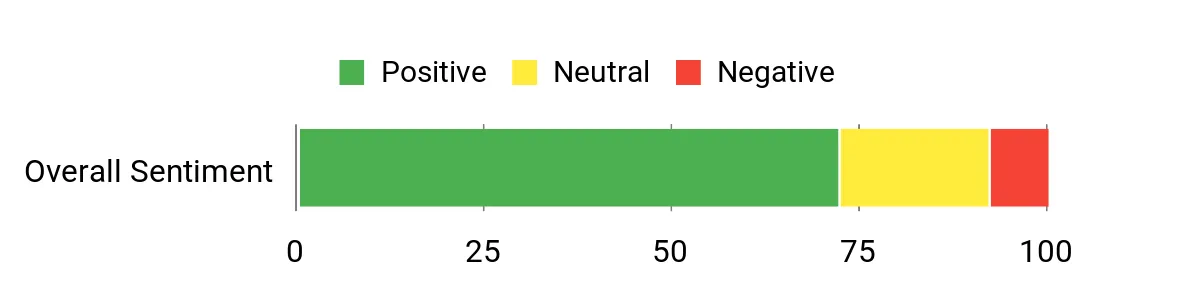
Users commonly praise the colorful tape options and the convenience of a handheld unit that prints clear, personalized labels. Many note the keyboard and preview screen help avoid mistakes, while some mention a learning curve for advanced features and the need for batteries or a power option.
Overall Sentiment: Positive
Use Cases
|
Situation |
How It Helps |
|---|---|
|
School Supplies |
Create bright name labels for notebooks, lunchboxes, and devices so belongings return home and kids recognize their stuff. |
|
Crafts & Scrapbooking |
Add colorful captions, dates, and decorative frames to projects without needing a computer or design software. |
|
Small Product Tags |
Make attractive price or ingredient tags for craft fairs and pop-ups that stand out from generic black‑and‑white labels. |
Time Savings
Saved labels and an on-device preview speed up repeats, and the QWERTY layout reduces typing time compared with multi-press keyboards.
Ease Of Use
|
Feature |
Ease Level |
|---|---|
|
Initial Setup |
Moderate |
|
Typing |
Easy |
|
Previewing Output |
Easy |
|
Replacing Tape |
Moderate |
Versatility
The PT‑N10 shines with colorful, personalized labels for school, home, and creative projects; it’s less suited to high-volume industrial labeling but flexible for many small-scale tasks.
Practicality
Battery power and a compact footprint make it portable, while the variety of Btag tapes gives you options for color and contrast that improve visibility and identification.
Customization
|
Feature |
Customization Level |
|---|---|
|
Color Tape Choices |
Excellent |
|
Fonts & Styles |
Good |
|
Frames & Symbols |
Strong |
|
Saved Labels |
Basic |
Key Benefits
-
Vibrant color tapes for standout labels
-
Full QWERTY keyboard for quick typing
-
Preview screen so you see output before printing
-
Saves frequent labels for fast reprints
⭐ Best All-Purpose

Brother PTD220
You get a dependable, no-nonsense labeler that handles most tasks you throw at it. The full keyboard and one‑touch formatting make it easy to create file, pantry, and cable labels, while the tape options let you pick laminated, waterproof, or specialty finishes.
Store frequently used layouts for quick reprints, and move the unit between rooms without fuss thanks to its compact build. If you want a versatile machine that balances simplicity and useful features, this is a solid choice.
What People Say
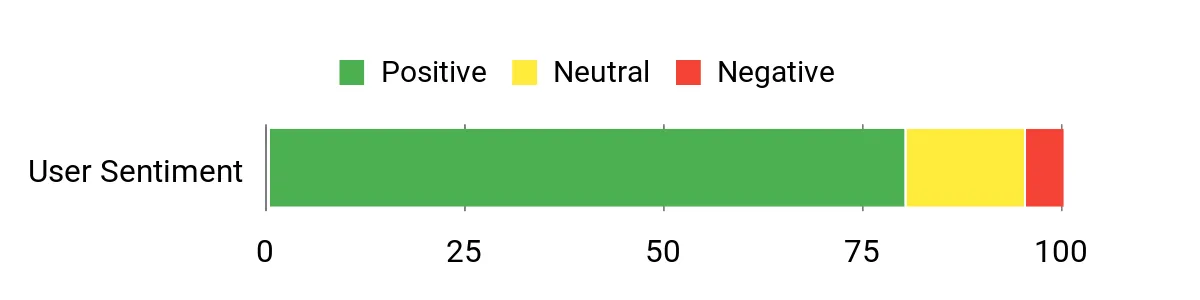
Users commonly note how reliable and straightforward the PT‑D220 is for everyday organization. People appreciate the variety of tape types and the ability to save frequently used labels, while many mention the clear print and intuitive formatting keys. A few users point out the display can be hard to read in low light and that it runs on batteries unless you add an adapter.
Overall Sentiment: Positive
Use Cases
|
Situation |
How It Helps |
|---|---|
|
Home Office |
Produce neat file and shelf labels so documents and supplies are easy to locate and share with colleagues. |
|
Kitchen & Pantry |
Use laminated or waterproof tapes to keep food labels legible through washing and freezer storage. |
|
Workshop and Tools |
Create durable tool and storage labels that resist wear and make inventory faster to manage. |
Time Savings
Saved label layouts, one‑touch formatting, and quick preview reduce the repetitive work of designing labels so you finish organization tasks faster.
Ease Of Use
|
Feature |
Ease Level |
|---|---|
|
Setup |
Easy |
|
Formatting & Templates |
Easy |
|
Tape Replacement |
Moderate |
|
Preview & Print |
Easy |
Versatility
Handles a broad range of everyday labeling needs from documents and storage to kitchen and workshop uses, with multiple tape materials and widths to match specific tasks.
Practicality
Its compact footprint and battery or adapter power options let you use it wherever you need, and genuine TZe tapes are widely available for straightforward refills.
Customization
|
Feature |
Customization Level |
|---|---|
|
Fonts & Sizes |
Strong |
|
Frames & Symbols |
Strong |
|
Tape Material Choices |
Excellent |
|
Saved Layouts |
Good |
Key Benefits
-
Easy standalone operation with QWERTY keyboard
-
Wide tape compatibility including laminated and waterproof options
-
Store up to 30 favorite label layouts for fast reprints
-
Compact, portable design suitable for home and office
💰 Best Bundle

DYMO LM160
You get a compact, grab-and-go labeler that feels familiar if you like a computer-style keyboard. Type on the QWERTY layout, use one-touch keys to format text, and print tidy labels for shelves, cables, and leftovers. The included cassettes mean you can start labeling right away, and the lightweight design makes it easy to carry between rooms when you’re tackling a big decluttering session.
It’s a practical choice if you want straightforward, reliable labels without a phone or PC.
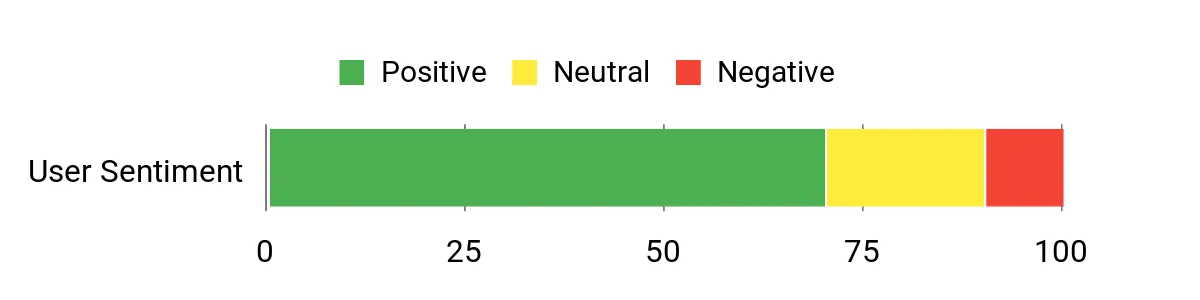
What People Say
Users often mention the comfortable keyboard and the simple formatting keys that make label creation fast and predictable. People like that it’s portable and comes with spare tapes, though a few report occasional jams or wish for a brighter display.
The consensus is that it’s a practical, no-frills tool for everyday labeling duties.
Overall Sentiment: Positive
Use Cases
|
Situation |
How It Helps |
|---|---|
|
Office Shelves |
Produce consistent folder and shelf labels so everyone can find documents quickly and the workspace looks tidy. |
|
Kitchen & Fridge |
Print clear food and date labels that help you rotate stock and reduce waste, using tapes suited to room or fridge conditions. |
|
Home Projects |
Label craft supplies, toolboxes, and storage bins to speed up project setup and cleanup. |
Time Savings
The QWERTY keyboard, one-touch formatting, and built-in symbols cut the time it takes to design and print common labels so you finish organizing faster.
Ease Of Use
|
Feature |
Ease Level |
|---|---|
|
Typing |
Easy |
|
Formatting |
Easy |
|
Replacing Tapes |
Moderate |
|
Reading Display |
Moderate |
Versatility
It handles a broad set of household and small-office labeling tasks with a wide selection of D1 tapes and multiple formatting options, though it’s aimed at everyday use rather than industrial-scale labeling.
Practicality
Auto power-off extends battery life, the device is lightweight enough to carry around, and D1 tapes are easy to find for refills, making it a practical tool for sustained organization efforts.
Customization
|
Feature |
Customization Level |
|---|---|
|
Formatting Options |
Strong |
|
Symbols & Clip-Art |
Good |
|
Tape Widths |
Good |
|
Duplex/Double‑Sided |
Basic |
Key Benefits
-
Computer-style QWERTY keyboard for fast typing
-
One-touch formatting and many symbols for quick styling
-
Compact, portable build for moving around the home or office
-
Bundle includes multiple D1 cassettes so you can start labeling immediately
🏷️ Best Durable

Brother PTH110
You get a compact, tough labeler designed for real-world use. The full keyboard and easy-view display make typing and previewing labels straightforward, and the laminated TZe tapes hold up against water, heat, and heavy handling. It prints up to two lines and saves frequently used labels so you can reprint without retyping.
The cable-labeling feature and wide tape support make it useful from the office to the garage, and the option to use batteries or an adapter keeps it flexible for on-the-go jobs.
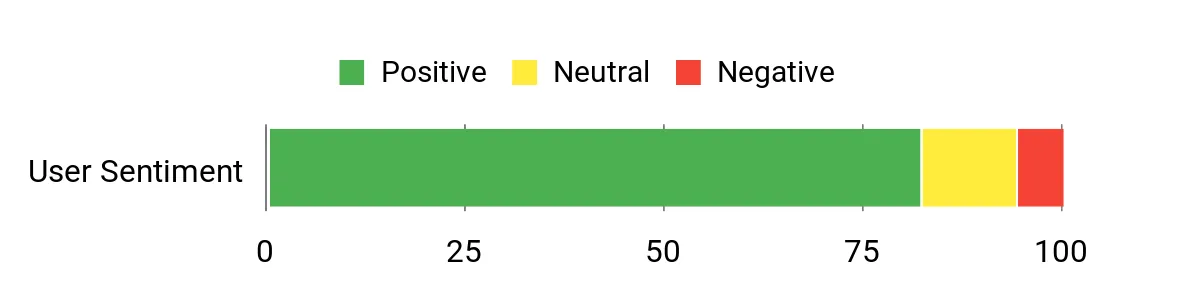
What People Say
People commonly note how sturdy the labels are and how reliably the PTH110 prints clean, professional text. Users highlight the convenience of the keyboard and saved label memory for recurring tasks, while some mention the need for batteries or an adapter and that genuine tapes are the best fit.
Overall Sentiment: Positive
Use Cases
|
Situation |
How It Helps |
|---|---|
|
Office Labeling |
Create consistent file, shelf, and drawer labels that keep your team on the same page and speed up document retrieval. |
|
Workshop & Tools |
Durable laminated tapes stand up to grease and wear so tool bins, drawers, and equipment stay clearly identified. |
|
Home Organization |
Label storage bins, seasonal clothing, and kitchen containers with long-lasting labels that survive handling and moisture. |
Time Savings
Saved label memory, one-touch functions, and a preview display reduce repetitive steps so you can produce labels faster and move on to the next task.
Ease Of Use
|
Feature |
Ease Level |
|---|---|
|
Initial Setup |
Easy |
|
Typing & Preview |
Easy |
|
Replacing Tape |
Moderate |
|
Using Memory Slots |
Easy |
Versatility
Supports a range of tape types and widths for everyday office, home, and light industrial uses, making it a flexible choice when you need labels that last.
Practicality
Compact and portable, the PTH110 works from a desk or on-site; genuine TZe tapes are widely available, and the ability to use batteries or an AC adapter fits different workflows.
Customization
|
Feature |
Customization Level |
|---|---|
|
Fonts & Sizes |
Strong |
|
Frames & Symbols |
Good |
|
Tape Width Choices |
Excellent |
|
Saved Labels |
Good |
Key Benefits
-
Durable laminated TZe tapes that resist water and fading
-
Full keyboard and preview screen for accurate labels
-
Stores up to 15 frequent labels for quick reprints
-
Wide tape compatibility for many labeling tasks
📡 Best Connected

Brother PTD610
You get a connected label maker built for workflows that need more than basic tags. Pair it with a phone or plug it into a PC to design wider, professional labels and decals, then print directly on durable TZe tapes.
It’s useful when you want consistent asset tags, cable IDs, or branded labels across multiple locations, and the wireless option means you can place the unit where it’s most convenient instead of next to a computer. If your labeling needs include integration with other tools or wider tapes, this model makes those jobs noticeably smoother.
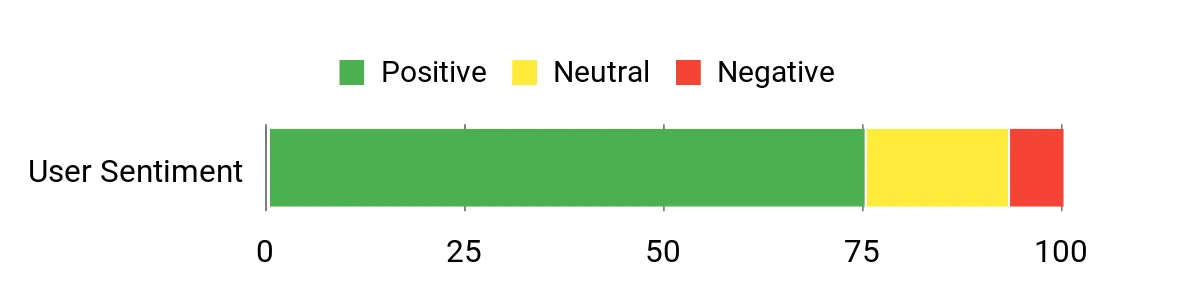
What People Say
Users tend to appreciate the connectivity options and the ability to print wider, more professional labels from both mobile and desktop. Many point out that the decal and heavy-duty tape options are a big step up for business uses, while a smaller group mentions a learning curve when setting up templates or integrating with software.
Overall Sentiment: Positive
Use Cases
|
Situation |
How It Helps |
|---|---|
|
IT & Cabling |
Print clear, durable cable IDs and patch‑panel labels that stay legible in server rooms and reduce time spent tracing connections. |
|
Asset Management |
Create consistent asset tags and barcode/ID labels that integrate with inventory workflows and make audits faster. |
|
Office Signage & Decals |
Produce branded decals and durable signs for equipment, doors, and shelving without routing jobs through a print shop. |
Time Savings
Designing on a PC or mobile app and sending batches wirelessly cuts setup time, and the ability to store templates or reuse label files speeds repeat tasks across teams.
Ease Of Use
|
Feature |
Ease Level |
|---|---|
|
Setup & Connectivity |
Moderate |
|
Designing Templates |
Easy |
|
On-device Controls |
Moderate |
|
Batch Printing |
Easy |
Versatility
Handles a wide mix of tasks from wide-format tapes and decals to standard office labels, making it suitable for IT, facilities, retail, and small business environments.
Practicality
With both wireless and wired options and support for durable TZe tapes, it fits on a desk or in a shared labeling station; the unit’s size favors a semi-permanent spot rather than pocket portability.
Customization
|
Feature |
Customization Level |
|---|---|
|
Tape Widths & Materials |
Excellent |
|
Decal & Specialty Printing |
Strong |
|
Software Integration |
Good |
|
Fonts & Layouts |
Strong |
Key Benefits
-
Bluetooth and USB connectivity for mobile and PC workflows
-
Supports wide TZe tapes and decal printing for professional labels
-
Durable output suited to asset tags, decals, and cable IDs
-
Desktop-ready design that integrates into office systems
🎨 Best Embossed
MeetRGB Emboss
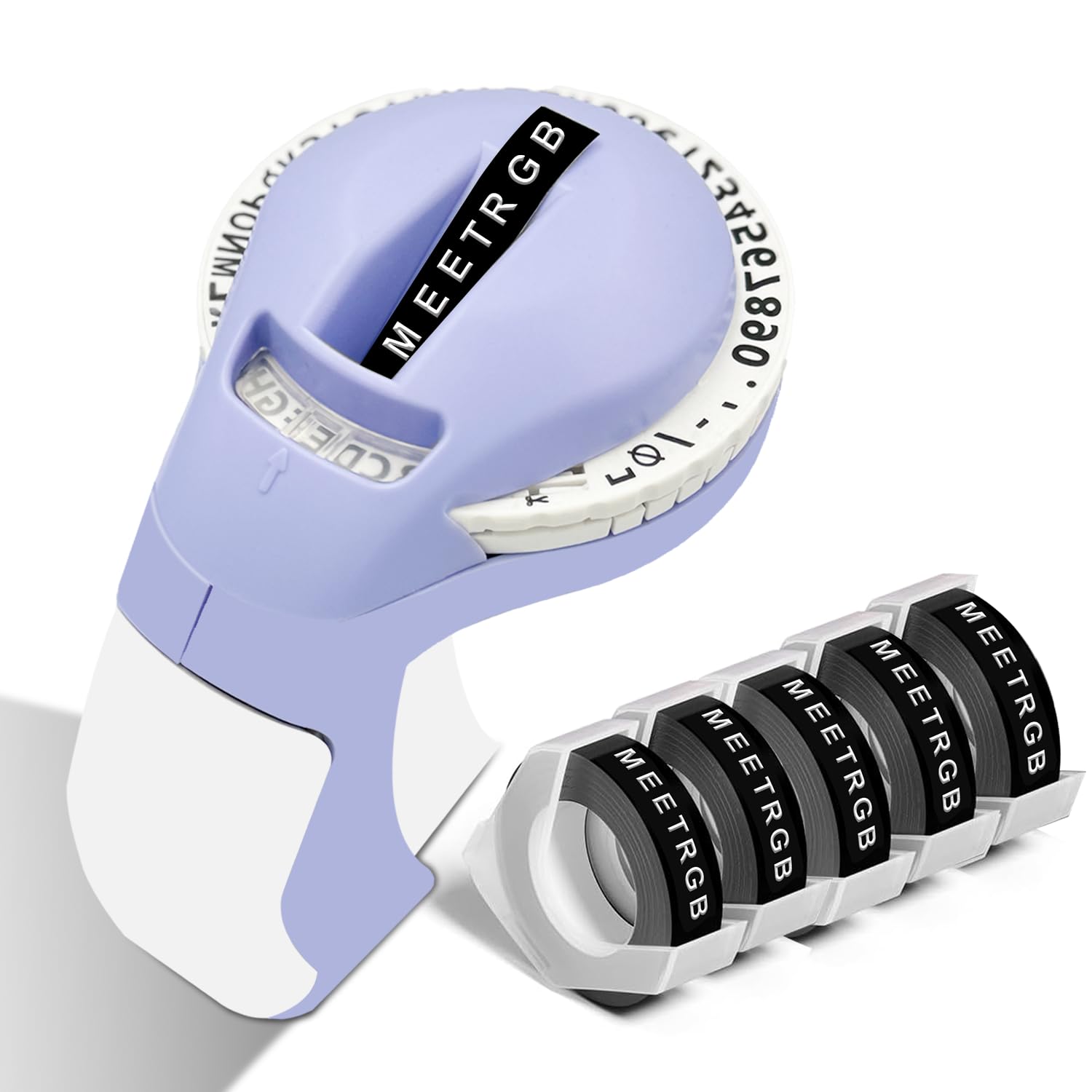
You get a tactile, retro labeler that produces raised, 3D lettering without batteries or ink. It’s great when you want charming, decorative tags for jars, scrapbooks, or gift labels and you don’t need high-volume output.
The manual mechanism gives a handmade look that can add personality to small projects, but it’s built for style over precision, so expect a slower, craft-focused workflow rather than crisp, machine-perfect text.
What People Say
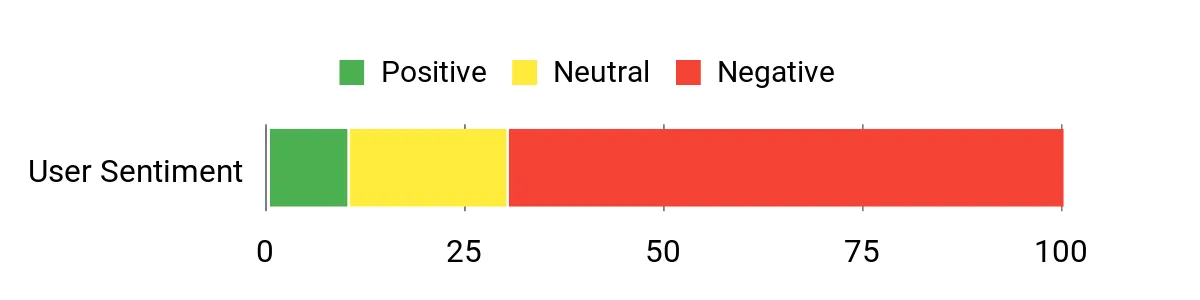
Customers often point out the vintage charm and the convenience of an inkless design, but many also call out alignment and quality issues. Reviews trend toward frustration with uneven embossing and a cheap feel, so people who prioritize decorative, occasional use talk about it more fondly than those expecting professional results.
Overall Sentiment: Negative
Use Cases
|
Situation |
How It Helps |
|---|---|
|
Craft Projects |
Adds a handmade, textured label to scrapbooks, cards, and gift tags for a nostalgic look. |
|
Home Labeling |
Quickly mark jars, plant pots, and storage with unique embossed tags that stand out visually. |
|
Event Details |
Create small place cards or favor tags with a vintage aesthetic for weddings, parties, or pop-up markets. |
Time Savings
For short runs and one-off tags you skip setup and power needs, but manual embossing takes longer than thermal printing for batches.
Ease Of Use
|
Feature |
Ease Level |
|---|---|
|
Initial Setup |
Easy |
|
Embossing Action |
Moderate |
|
Loading Tape |
Moderate |
|
Cleanup |
Easy |
Versatility
Best for decorative, low-volume labels and craft projects; not intended for precise, professional labeling or wide-format needs.
Practicality
No power makes it practical for occasional use and craft sessions, but alignment and durability concerns limit usefulness for professional or heavy-duty labeling.
Customization
|
Feature |
Customization Level |
|---|---|
|
Tape Styles |
Limited |
|
Fonts & Sizes |
Basic |
|
Symbols |
Limited |
|
Color Choices |
Basic |
Key Benefits
-
Inkless, tactile 3D embossed lettering
-
No batteries or power required
-
Comes with multiple rolls so you can start crafting
-
Compact, handheld for quick decorative tags
🔧 Best Industrial
VolenGo E1000
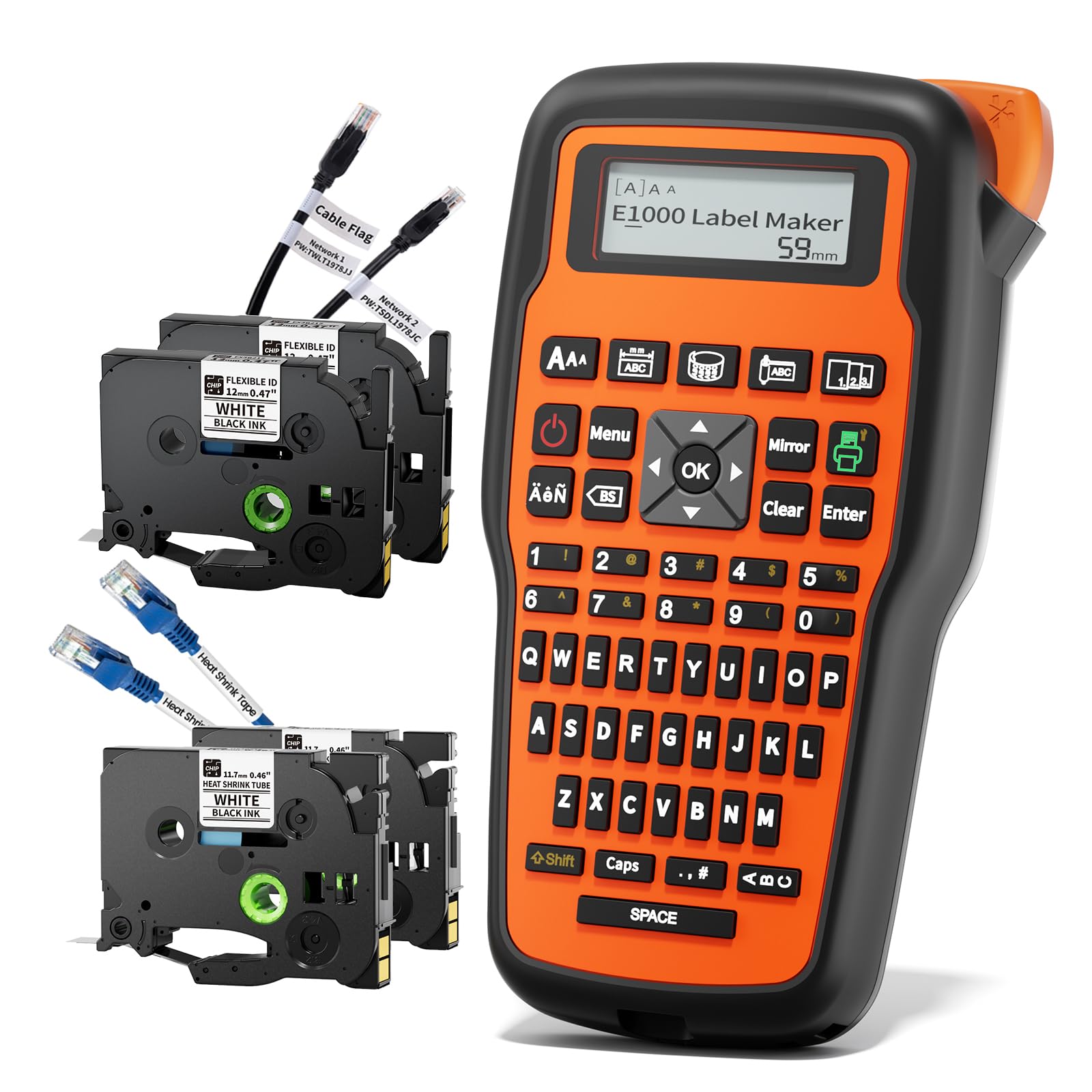
You get a purpose-built labeler made for cable and equipment tagging. It prints heat-shrink tube labels and flexible cable tapes that shrink or wrap cleanly around wires, so your labels survive heat, solvents, and long deployments.
The compact design and included USB Type-C cable make it easy to bring into a jobsite, and the QWERTY input plus straightforward controls keep the workflow focused on fast, durable output rather than fanciful formatting. If you do field installations or maintain equipment, this one streamlines cable ID and keeps your wiring organized.
What People Say
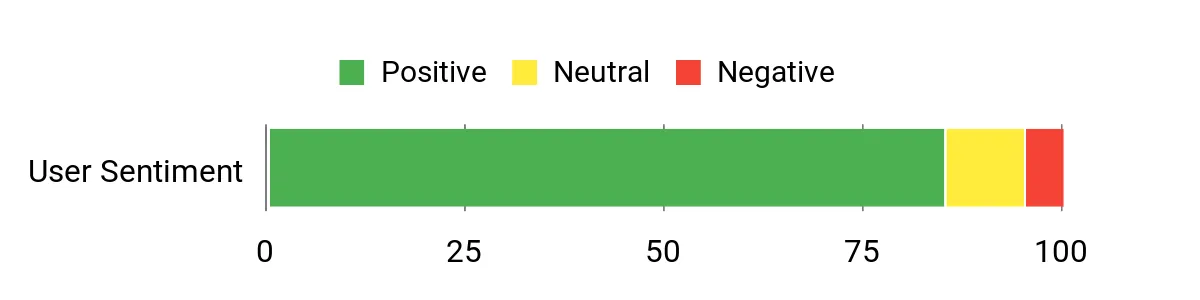
People tend to highlight how useful the heat-shrink capability is for professional cable work and appreciate that the package includes the right tapes to get started. Customers mention the unit is lightweight and easy to carry between sites, and that printed shrink tubing makes cable identification much more reliable than handwritten tags.
Overall Sentiment: Positive
Use Cases
|
Situation |
How It Helps |
|---|---|
|
Field Installations |
Produce shrink-fit labels on site so cables are identified correctly before installation is completed. |
|
Maintenance & Repairs |
Durable heat-shrink labels stay readable through handling and exposure, speeding troubleshooting and parts replacement. |
|
Panel & Equipment Tagging |
Create professional-looking cable and terminal IDs that hold up in electrical cabinets and industrial environments. |
Time Savings
Direct heat-shrink printing and included supplies cut preparation time, and the device’s compact workflow reduces back-and-forth to a workstation when labeling many cables.
Ease Of Use
|
Feature |
Ease Level |
|---|---|
|
Setup & Connectivity |
Easy |
|
Label Loading |
Moderate |
|
Heat-Shrink Printing |
Easy |
|
Batch Labeling |
Easy |
Versatility
Built mainly for 12mm heat-shrink tubing and flexible cable tapes, it’s ideal for electrical and safety labeling but also handles general equipment tags where durable shrink-fit labels are needed.
Practicality
USB connectivity and a small footprint mean you can use it in a van, on a bench, or at a rack; included tapes and cutter make it a practical kit for technicians who need a complete solution in the field.
Customization
|
Feature |
Customization Level |
|---|---|
|
Tape Sizes Supported |
Good |
|
Font & Size Choices |
Moderate |
|
Label Content (Numbers/Letters) |
Good |
|
Batch/Repeat Printing |
Good |
Key Benefits
-
Prints heat-shrink tubing and flexible cable labels for durable wire IDs
-
Compact and portable for field or workshop use
-
Includes USB Type-C cable and replacement cutter for on-site readiness
-
Designed specifically for industrial electrical labeling tasks
FAQ
Should I Choose Bluetooth Or Standalone?
Think about how you work: if you move around and want quick, styled labels from your phone, a Bluetooth app-controlled unit gives you template flexibility and portability. If your team needs a simple, walk-up device that anyone can use without a phone, a standalone machine with physical keys and built-in templates is a more practical choice.
What Tape Types Work Best?
Match the tape to the job: laminated TZe-style tapes are the go-to for durable, weather-resistant labels, thermal waterproof rolls are great for pantry and storage, and heat-shrink tubing is ideal for cable and wire identification. For decorative projects you can use embossed or colored Btag tapes, but expect those to be more about style than heavy-duty longevity.
How Do I Maximize Label Life?
Start with a clean, dry surface and press the label firmly to ensure good adhesion, and use laminated or waterproof tapes where moisture or heat is likely. Save common templates to speed reprints, choose the correct tape width to avoid excessive trimming, and store spare rolls away from direct sunlight and extreme temperatures to keep adhesives and print quality stable.
Wrapping Up
Choosing the right label maker removes small daily frictions and keeps your systems predictable and efficient. You gain faster onboarding for teammates, fewer lost items, and clearer tracking when your labels survive the conditions you encounter.
If you need portability and low cost, a mobile Bluetooth unit like the Nelko P21 is a strong pick. For dependable, professional labels and broad tape choices, Brother models cover personal, office, and business needs, while DYMO offers an approachable bundle to get started.
For specialized electrical or wire labeling, the VolenGo E1000 provides heat-shrink capability that lasts. Use this list to match a machine to the tasks you do most so you spend less time searching for things and more time getting work done.
|
Product Name |
Image |
Printing Technology |
Max Print Speed (Monochrome) |
Weight |
|---|---|---|---|---|
|
|
Thermal |
30 ppm |
0.72 pounds |
|
|
|
Thermal |
20 ppm |
1.1 pounds |
|
|
|
Thermal |
9 ppm |
1 pounds |
|
|
|
Thermal |
20 ppm |
1.08 pounds |
|
|
|
Thermal |
N/A |
1.34 pounds |
We participate in affiliate programs including the Amazon Services LLC Associates Program, or Impact, affiliate advertising programs designed to provide a means for creators to earn fees by linking to websites. We may earn a referral commission from qualifying purchases which supports the site and creation of these reviews.