
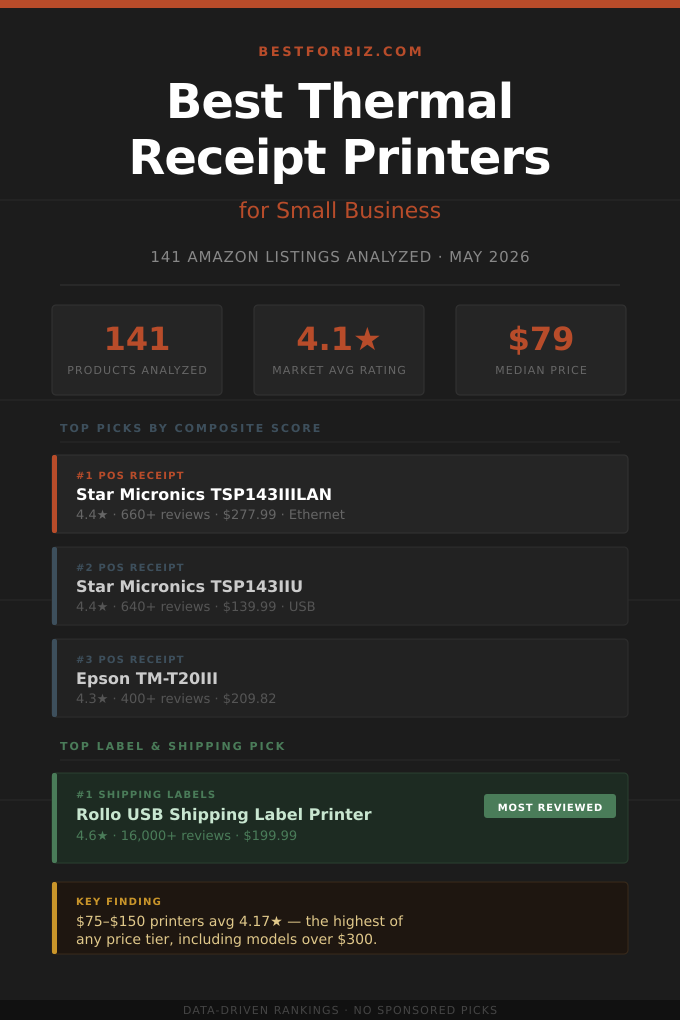
The thermal receipt printer market looks straightforward until you start browsing Amazon. A single search returns POS restaurant printers, 4×6 shipping label makers, compact Bluetooth label printers, and several pages of paper rolls all mixed together. The category has two genuinely different buyer types, and choosing the wrong one means returning hardware that was never designed for your workflow. We pulled 141 listings, separated the product types, and ran a composite score across rating and verified review volume to find which printers have actually earned their rankings.
The most important finding: price does not reliably predict quality in this market. Printers in the $75 to $150 range averaged 4.17 stars, the highest of any price tier, while products under $40 averaged just 3.84. Budget printers drew the harshest reviews, mostly around connectivity failures and paper feed problems. At the top of the market, a few brand-name POS printers from Star Micronics and Epson dominate on score despite high price tags, while Rollo has built a commanding lead in shipping labels with 16,000+ reviews at 4.6 stars, which is rare for hardware in this category.
This analysis covers two thermal printer types: POS receipt printers for point-of-sale and kitchen environments, and label and shipping printers for e-commerce and small-business fulfillment. Paper rolls and consumables are covered in a separate companion section at the end.
How the Thermal Printer Market Actually Breaks Down
Across 141 Amazon listings, the thermal printer market splits roughly 72% printers and 28% paper and consumables. Within printers, the breakdown is about 80% POS receipt printers and 20% label and shipping printers. That 20% punches well above its weight in review volume: the top label printer in this dataset (Rollo) has more reviews than the top five POS printers combined.
The rating distribution for thermal receipt printers follows a pattern common in competitive commodity markets: a sharp left tail of poorly-rated budget options, a broad cluster in the 4.0 to 4.4 range where most serious contenders sit, and a thin premium tier above 4.5. Only 7 out of 91 organic printer listings scored 4.6 or higher. That number alone is a useful filter: if a printer is showing 4.6+ stars with a meaningful review count, something is working that most competitors haven’t figured out.
N=91 organic thermal printer listings (paper/supplies excluded from chart). Ratings as of May 2026.
The 3.5 to 3.9 range is a warning zone. These are often printers from newer or less-established brands that entered the market on low price alone. They’re not necessarily broken, but they’ve accumulated enough negative reviews on driver compatibility, connectivity dropouts, and poor customer support that the aggregate score tells a clear story. Below 3.5 stars, the issues are typically more fundamental: paper feeding, cutter reliability, or outright hardware failure.
The 4.3 to 4.5 cluster is where most of the buying decisions should be made. Twenty-nine printers landed here, representing a mix of budget-to-mid options that have found a working formula: consistent connectivity, reliable auto-cutters, and driver support broad enough to keep negative reviews from piling up. The gap between a 4.3-star printer and a 4.5-star one is usually marginal. The gap between 4.3 and 3.8 is not.
Does Spending More Get You a Better Thermal Printer?
The short answer is: up to a point, yes — then no. The $75 to $150 range is the sweet spot by the data. Printers here averaged 4.17 stars, the highest of any tier. Above $150, ratings actually declined slightly, likely because commercial-grade printers draw more demanding buyers who have specific integration requirements and aren’t shy about leaving reviews when things go wrong. Below $40, the average drops to 3.84, a meaningful gap that shows up in real-world experience.
N=91 organic thermal printer listings. Average rating calculated per tier. Paper/supplies excluded.
The $150 to $300 range underperforming the $75 to $150 range isn’t an anomaly. It reflects a buyer profile shift. Mid-range buyers are often small restaurant or retail owners replacing a failed printer, and a reasonably smooth experience earns a good review. High-end buyers are often IT managers or multi-location operators who have integration checklists and will leave detailed negative reviews when ESC/POS command sets or cash drawer kick outputs don’t behave as documented. The expectations are higher, and the review scores reflect that.
For most small businesses, the data suggests spending somewhere between $70 and $150 is the rational range. Below $70, you’re trading rating quality for savings that may not hold up over the printer’s service life. Above $150, you’re paying for commercial durability and broader interface support, which only matters if your environment genuinely needs it.
Two Types, Two Completely Different Use Cases
Amazon’s search results for “thermal receipt printer” routinely mix two product types that serve fundamentally different buyers. POS receipt printers are fixed-location, typically Ethernet or USB connected, print 80mm or 58mm receipt paper, and are designed for point-of-sale systems, restaurant kitchens, and retail counters. Label and shipping printers print 4×6 labels, connect via USB or Bluetooth, and exist entirely to produce shipping labels, barcodes, and product tags for e-commerce fulfillment. The hardware and the use cases have almost no overlap.
N=141 total listings including sponsored. Classification based on title keywords and product characteristics.
Label printers are a small fraction of the result count but carry outsized review weight. Rollo alone accounts for 16,000+ reviews, more than the entire POS segment’s top five combined. This tells you something about the e-commerce buyer: they purchase in higher volume, leave more reviews, and tend to be methodical enough about their business operations that they’ll take the time to rate the hardware. POS buyers are often one-time purchasers for a specific location, so review volume per model stays lower.
The practical implication: if you run a restaurant, retail shop, or any environment with a point-of-sale system, you need a POS receipt printer. If you ship packages for any e-commerce operation, even a side business on Etsy, Shopify, or eBay, a label printer is the correct tool. Buying a POS receipt printer to print shipping labels, or trying to use a label printer for customer receipts, creates compatibility headaches that good reviews won’t warn you about because buyers in those situations rarely leave reviews at all.
The Best Thermal Printers Ranked by Data
Rankings use a composite score that combines star rating with the natural log of verified review count. This weights products that have proven their quality at scale while still allowing newer, high-rated products to compete. Only organic (non-sponsored) listings are included. Sponsored placements appeared in 6 listings across the full dataset and were set aside before scoring.
POS & Kitchen Receipt Printers
Label & Shipping Printers
Brand-by-Brand Breakdown: Who to Trust and Who to Watch
Thirteen brands had two or more products in the organic dataset. The spread is wide. Star Micronics and Epson lead on brand consistency. MUNBYN and Rongta dominate on volume. Several newer entrants cluster in the 3.5 to 3.9 range with limited review counts, which makes their ratings less reliable but also suggests they haven’t faced the scrutiny of brands with thousands of cumulative reviews.
| Brand | Products | Avg Rating | Total Reviews | Avg Price | Take |
|---|---|---|---|---|---|
| Star Micronics | 6 | ★ 4.08 | 1,500+ | $234 | The commercial standard. Consistent across price points, premium support. |
| Epson | 9 | ★ 4.06 | 690+ | $238 | Trusted brand with deep POS software compatibility. High price, worth it for commercial use. |
| Volcora | 4 | ★ 4.38 | 200+ | $89 | High average rating with low review counts. Promising but limited track record. |
| vretti | 2 | ★ 4.35 | 200+ | $75 | Solid mid-range rating at a reasonable price. Not enough reviews to rank confidently. |
| MUNBYN | 12 | ★ 4.13 | 5,100+ | $109 | Most products in dataset. Consistent mid-market performer across both POS and label. |
| Rongta | 13 | ★ 4.15 | 2,000+ | $73 | Largest product count. Best value-to-rating ratio in the budget POS segment. |
| symcode | 3 | ★ 3.77 | 185+ | $108 | Mid-range pricing with below-average ratings. Driver and compatibility issues in reviews. |
| NETUM | 3 | ★ 3.53 | 1,060+ | $81 | Meaningful review count with notably low average. Connectivity issues are a recurring theme. |
| NetumScan | 2 | ★ 3.75 | 124+ | $65 | Low review count and below-average rating. Insufficient data to recommend. |
MUNBYN’s dataset presence is worth noting. Twelve products across both POS and label categories, a 4.13 average, and 5,100+ cumulative reviews makes them the most volume-tested mid-market brand in this analysis. They don’t hit the heights of Star or Epson on any individual product, but they’ve built a portfolio with consistent execution at prices most small businesses can actually justify. The P068 receipt printer and the 130B label printer both made the top-five lists in their respective categories.
Rongta leads on product count at 13 entries and maintains a 4.15 average across a portfolio that spans $30 to $120. For budget-conscious operators who want something more tested than an unknown brand but can’t justify the Star/Epson price, Rongta is the most logical choice. The RP326 specifically earned its rank-four POS position with a combination of multi-interface support and review stability that most competitors in the $80 bracket don’t match.
NETUM is the one brand in the dataset worth calling out specifically as a risk. Over 1,000 reviews at 3.53 stars is a pattern that usually reflects a consistent underlying hardware or firmware issue, not just a few vocal detractors. At the $80 price point, there are better-reviewed alternatives from Rongta and Volcora that make NETUM a hard sell on the data alone.
Best Receipt Paper Rolls to Buy With Your POS Printer
Nearly a third of thermal printer search results on Amazon are paper and supplies, not printers. Paper isn’t glamorous, but wrong paper choices cause real problems: paper that’s too thin fades quickly, wrong widths cause feed jams, and BPA-containing paper is increasingly regulated in food-service environments. The top-rated options in this dataset are all 3 1/8″ rolls, which is the standard width for 80mm POS printers. Here are the three that rose to the top by composite score.
How to Choose the Right Thermal Printer for Your Business
Most buying mistakes in this category come from answering the wrong question first. Start here before comparing spec sheets.
This is the single most important question, and the answer eliminates half the market immediately. POS receipt printers use roll paper (80mm or 58mm), connect to a point-of-sale system, and are fixed to a counter. Label printers use 4×6 label stock, connect via USB or Bluetooth, and produce the adhesive labels you peel and stick to a shipping package. They are not interchangeable. If you’re unsure, look at your current output: if it’s a strip of paper the customer keeps, you need a receipt printer. If it’s a label that goes on a box, you need a label printer.
Square, Clover, Toast, Lightspeed, and most other major POS platforms publish certified hardware lists. Buying an uncertified printer risks integration failures that no amount of driver troubleshooting will fix. The Star Micronics TSP143 series and Epson TM-T20III are on almost every major compatibility list. Budget brands like Rongta and MUNBYN work with many POS systems via ESC/POS emulation but may not be on official lists, which matters if you’ll need support from your POS provider.
USB printers work fine for single-terminal setups where one computer drives one printer. If you need multiple terminals — a front-of-house POS and a kitchen printer on the same network, for example — you need Ethernet. The Star TSP143IIILAN handles this natively. Most budget printers support Ethernet in name but may require additional configuration that’s not well documented. When in doubt, spec for Ethernet even if you don’t need it today.
Rollo, Nelko, and MUNBYN 130B print 4×6 labels, which is what USPS, UPS, FedEx, and DHL expect for package shipping. NIIMBOT B1 and Phomemo M110 print smaller formats suitable for address labels, product tags, barcodes, and file organization, but they cannot print 4×6 shipping labels. Buying the wrong type means labels that either don’t fit the label stock or produce output carriers won’t scan.
For low-volume operations (under 50 receipts or labels per day), budget options from Rongta or MUNBYN at $80 to $130 make sense. For moderate to high volume, the $140 to $280 range from Star or Epson pays for itself in reliability and reduced downtime. For shipping labels, Rollo at $200 is the commercial-grade standard, but Nelko at $66 is a legitimate alternative if your volume is under a few dozen labels per day.
Final Verdict: What the Data Recommends
The thermal printer market rewards buyers who define their use case before comparing specs. Once you know whether you need a receipt printer or a label printer, the data narrows the field quickly. For POS environments, Star Micronics and Epson own the top two composite score positions, and no budget brand comes close on combined rating and review depth. For label and shipping, Rollo’s margin over the competition is exceptional and rare for hardware at any price point.
The broader lesson from the price-tier analysis: the $75 to $150 range consistently outperforms everything below it and slightly outperforms everything above it on average rating. That’s the zone where build quality has caught up to price without the buyer profile shifting toward hyper-critical commercial operators. If you’re spending outside that range, you should have a specific reason, whether that’s needing sub-$50 for a backup unit, or requiring Star’s Ethernet multi-terminal support at $278.
Related business guides: printers for shipping labels guide and barcode scanner for small business guide for more practical business equipment advice.