

You spend hours at your desk and the keyboard you use shapes how your hands, wrists, and shoulders feel by the end of the day. Ergonomic keyboards change the angle and layout of typing so you can reduce wrist strain, type more comfortably for longer stretches, and often work more efficiently. Choosing the right ergonomic option lets you focus on your tasks instead of fidgeting with discomfort, which makes this an important upgrade for any office setup.
Top Picks
|
Category |
Product |
Score |
|---|---|---|
|
💰 Best Budget Combo |
81/100 |
|
|
🏆 Best Premium Split |
92/100 |
|
|
🔌 Best Wired Reliability |
84/100 |
|
|
⭐ Best Wrist Support |
88/100 |
Selection Criteria
You want a keyboard that actually improves how you feel while working, so we focused on the factors that matter most to everyday use. Ergonomic design and wrist support were prioritized to ensure reduced bending and better hand placement.
Key feel and noise level were weighed because comfortable, responsive keys make long typing sessions less fatiguing. Connectivity and setup simplicity matter if you move between devices, and battery life or wired reliability affects how often you interrupt your flow.
We also considered build quality and value so you can pick an option that fits your budget without sacrificing core ergonomics.
💰 Best Budget Combo
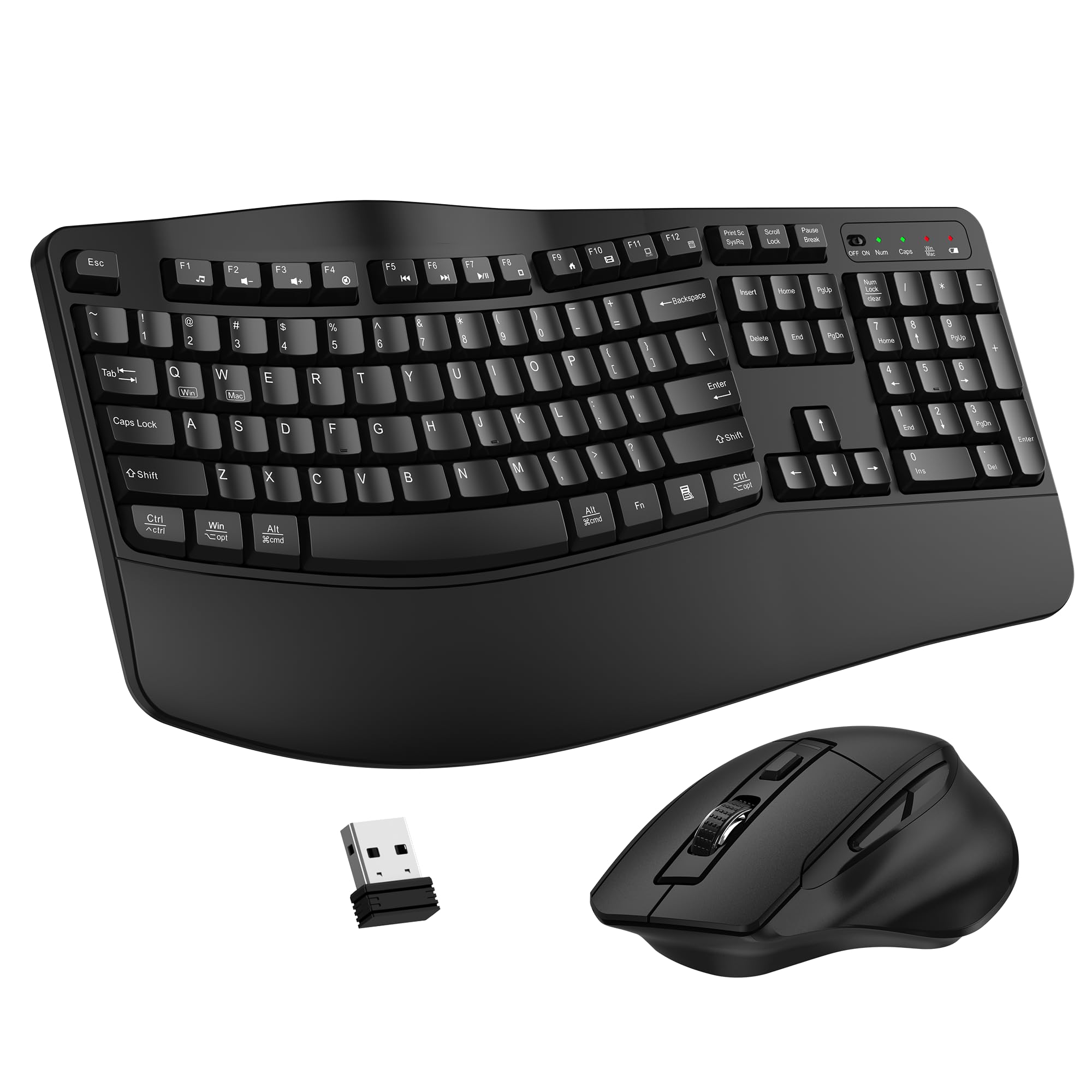
ULSOU Combo
You get a straightforward ergonomic upgrade that focuses on comfort and reliability. The wave-shaped keyboard nudges your hands into a more natural position while the sloped wrist rest gives constant support for longer typing sessions.
The mouse adds three DPI settings so you can switch between precise work and quicker navigation, and both devices connect via a single 2.4 GHz USB receiver for a plug-and-play experience. For your daily office tasks, remote work, or home study sessions, this combo delivers practical ergonomics without extra complexity, making it easy to feel better at your desk.
What People Say
People commonly mention how quick and painless the setup is and how the wave keys and wrist rest improve comfort during long work sessions. Many appreciate the mouse’s feel and the adjustable DPI, and reviewers frequently call out the dependable wireless pairing.
A few note the wrist rest is firm rather than cushioned and the keys can be a touch louder than premium models, but overall sentiment centers on solid value and everyday usability.
Overall Sentiment: Positive

Health Benefits
|
Benefit |
Description |
|---|---|
|
Reduced Wrist Strain |
The curved key layout and gentle wrist slope help keep your wrists closer to neutral, which can lower strain during extended typing. |
|
Lower Forearm Tension |
By positioning your hands more naturally, your forearm muscles don’t have to fight awkward angles, easing fatigue over long sessions. |
|
More Stable Posture |
A consistent hand placement means you shift less and can maintain a healthier typing posture throughout the day. |
Versatility
You can use this combo for typical office work, remote meetings, casual gaming, or school tasks; the keyboard is full-size while the mouse covers both precision and speed needs.
Practicality
You only need one USB dongle for both devices and standard AA batteries, so setup and maintenance fit easily into a busy desk routine and shared environments.
Comfort
You’ll notice a gentler hand angle from the wave keys and the wrist rest helps reduce pressure, though the rest is firm rather than heavily padded.
Key Benefits
- You get a wave-shaped layout that reduces wrist bending and encourages a relaxed hand posture
- You get continuous wrist support from the built-in rest that helps during long typing sessions
- You get a 3-level DPI mouse for easy switching between precise and fast cursor control
- You get a single 2.4 GHz USB receiver for quick, driver-free setup and stable wireless connection
🏆 Best Premium Split

Logitech K860
You get a refined split layout that nudges your hands into a more natural position and keeps your wrists supported during long workdays. The pillowed wrist rest and adjustable palm lift let you fine tune the height for sitting or standing, while the low profile keys deliver a smooth, confident typing feel. Dual connectivity means you can switch between devices without fuss, and the integrated numpad keeps it practical for spreadsheets and data entry.
It’s a solid pick if you want a durable, ergonomic upgrade that actually helps with comfort during heavy typing sessions.
What People Say
Customers frequently praise how the split design and wrist rest reduce discomfort during long typing sessions and how the keys feel solid without being loud. Many also like the multi-device pairing and the presence of a numpad, though some mention the palm rest texture and the initial adjustment period for the layout. Overall impressions lean toward improved comfort and dependable connectivity.
Overall Sentiment: Positive

Health Benefits
|
Benefit |
Description |
|---|---|
|
Less Wrist Flexion |
The angled split layout reduces how far your wrists bend, which can lower irritation and repetitive strain during extended typing. |
|
Reduced Forearm Tension |
By aligning your hands more naturally, the keyboard helps your forearm muscles relax and work with less effort over long sessions. |
|
Improved Posture |
Consistent hand placement and wrist support make it easier to maintain a healthier overall typing posture, which can ease neck and shoulder strain. |
Versatility
You can use this keyboard for coding, writing, data entry, hybrid work setups, and sit-stand desks thanks to its full layout, numpad, and easy device switching.
Practicality
A physical power switch and both Bluetooth and USB receiver options make it simple to manage power and connectivity, and the replaceable batteries keep it running without surprise downtime.
Comfort
The pillowed wrist rest and adjustable palm lift give steady support and a cushioned feel, while the low profile keys minimize finger fatigue during long typing stretches.
Key Benefits
- Split curved layout that encourages a more natural hand position
- Pillowed wrist rest plus adjustable palm lift for personalized support
- Low profile Perfect Stroke keys for smooth, precise typing
- Dual Bluetooth and USB connections for multi-device use
- Full-size layout with integrated numpad for productivity
🔌 Best Wired Reliability

Perixx Periboard
If you want a no-nonsense ergonomic upgrade that stays put, this wired Perixx keyboard is worth a look. The wider, split layout gives your hands room to rest where they want, and the built-in wrist support helps you keep a steady posture during long work sessions. It’s a good match for a fixed workstation, a slide-out keyboard tray, or anyone who prefers the predictability of a wired connection.
You’ll appreciate the familiar key spacing and straightforward plug-and-play setup if you’re moving from older natural keyboards and want something stable and durable for everyday office use.
What People Say
Many users highlight how the wider split layout and solid key feel bring back the comfort they liked from older natural keyboards, noting it sits nicely on trays and desk setups. People often praise the reliability of the wired connection and the straightforward plug-and-play use.
A few mention an adjustment period for key placement or occasional quirks with specific keys, but overall the conversation centers on comfort and dependable daily performance.
Overall Sentiment: Positive

Health Benefits
|
Benefit |
Description |
|---|---|
|
Reduced Wrist Strain |
The split geometry encourages a more neutral wrist angle, which can reduce the bending that contributes to discomfort over long typing sessions. |
|
Less Forearm Fatigue |
Giving your hands a bit more lateral space reduces awkward reach and helps your forearm muscles relax during extended work. |
|
Consistent Posture Support |
A full-size layout with an integrated rest promotes a stable hand position that makes it easier to maintain healthier overall typing posture. |
Versatility
Best suited to a dedicated desk or tray where a wired connection and full-size layout are priorities; works for typing, data entry, and long writing sessions.
Practicality
Plug it into a USB port and start typing—no drivers needed for most systems, and the wired design eliminates battery swapping or pairing steps.
Comfort
The curvature and key travel lean toward a traditional, comfortable typing feel that many long-time natural keyboard users prefer, though it may take a short adjustment period.
Key Benefits
- Wired connection offers consistent, lag-free performance for sustained typing
- Full-size split layout gives wider hand placement for relaxed posture
- Integrated wrist rest supports wrists without extra accessories
- Sturdy build and familiar key feel for users transitioning from classic natural keyboards
⭐ Best Wrist Support

Logitech Wave
You get a compact ergonomic layout that keeps your hands in a more natural position while a memory-foam palm rest provides steady support through long work sessions. It pairs via Bluetooth or the Logi Bolt receiver and lets you switch between devices with a tap, so it’s handy for hybrid setups where you move between laptop and tablet.
The keys are tuned for quiet, confident typing and you can customize shortcuts with the Logi Options+ app to speed up repetitive tasks. If you want a comfortable, modern keyboard that fits both a home office and a shared workstation, this one balances support and features in a tidy package.
What People Say
People often mention how comfortable the palm rest feels and how the wave layout eases wrist fatigue during long typing sessions. Many appreciate the quiet key action and the simple multi-device pairing, while others note that the compact footprint can take a few days to get used to.
Overall, most feedback centers on improved day-to-day comfort and helpful productivity features.
Overall Sentiment: Positive

Health Benefits
|
Benefit |
Description |
|---|---|
|
Reduced Wrist Pressure |
The memory-foam palm rest cushions the base of your hands so your wrists sit with less direct pressure, easing discomfort during extended typing. |
|
More Neutral Hand Position |
The wave-shaped key layout nudges your hands toward a more natural angle, which can lower the bending that contributes to strain. |
|
Less Finger Fatigue |
Keys with a responsive yet quiet feel mean you don’t have to press as hard, helping reduce finger and tendon stress over long sessions. |
Versatility
Works well for typical office work, multitasking across devices, data entry, and creative tasks where comfortable, sustained typing matters.
Practicality
Battery-powered design and dual connectivity make it low-maintenance and flexible for shared setups, and the Logi Bolt receiver helps with secure, stable connections.
Comfort
The palm rest gives tangible support and the wave contour helps keep your hands relaxed; expect a short break-in as you adjust to the different key spacing.
Key Benefits
- Cushioned memory-foam palm rest that reduces wrist pressure
- Wave-shaped layout that promotes a gentler hand angle
- Easy-Switch lets you pair and swap between three devices quickly
- Long battery life that reduces interruptions for charging or replacements
- Customizable shortcuts via Logi Options+ for better workflow
FAQ
Do Ergonomic Keyboards Actually Reduce Pain?
Yes—ergonomic keyboards can help by changing how your wrists and hands sit while you type, which often leads to reduced wrist strain and less forearm tension. They don’t fix poor posture on their own, so pair the keyboard with an adjusted chair and monitor height and take regular breaks. Expect an adjustment period as your muscles learn a new position, and you’ll usually notice gradual improvement rather than an instant cure.
How Do I Choose The Right Ergonomic Keyboard?
Think about how you work and what feels natural to you: do you prefer a split layout, a wave curve, or a compact design with a cushioned palm rest. Pay attention to key feel—low-profile laptop-style keys feel different than taller membrane or mechanical keys—and whether you need a full numpad for spreadsheets. Also consider desk space, wired versus wireless connectivity, and whether a firm or padded wrist rest suits your comfort; trying one for a few days will tell you more than specs alone.
Are Wireless Ergonomic Keyboards Reliable And Easy To Set Up?
Most modern wireless ergonomic keyboards are reliable and simple to pair, either via Bluetooth or a 2.4 GHz USB receiver that often supports both keyboard and mouse on one dongle. For the smoothest experience, keep the receiver unobstructed and use fresh batteries or rechargeable cells as needed. If you want absolute consistency with no pairing or battery worries, a wired model gives predictable, lag-free performance, but wireless options are perfectly fine for everyday office use.
Wrapping Up
If you want the biggest ergonomic improvement for the least outlay, the ULSOU Combo gives you a wave-shaped keyboard and wrist rest plus a reliable wireless mouse for $34.98, making it a strong budget pick. If you type for long stretches and can invest in premium ergonomics, the Logitech K860 delivers advanced split geometry and generous wrist support that reduces bending and fatigue.
Choose the Perixx Periboard if you prefer a wired, full-size split layout with solid typing feel and straightforward reliability. If your priority is a cushioned palm rest, multi-device pairing, and a quieter, modern layout, the Logitech Wave balances comfort and features at a midrange price. Think about how you work, then pick the model that matches your needs for comfort, connectivity, and budget so you can start feeling the difference at your desk.
| Product Name | Image | Connectivity | Power Source | Dimensions & Weight | Special Highlights |
|---|---|---|---|---|---|
| Wireless Keyboard and Mouse Combo |
|
USB (2.4G wireless) | 2 AA batteries required. | 17.6 x 8.7 x 1.4 inches, 2.6 pounds |
|
| Logitech Ergo K860 Wireless Ergonomic Keyboard |
|
Bluetooth and USB | 2 AAA batteries required (included) | 9.17 x 17.95 x 1.89 inches, 0.01 ounces |
|
| Perixx PERIBOARD-512B Wired Ergonomic Keyboard |
|
Wired USB | Corded Electric | 18.92 x 9.2 x 1.72 inches, 2.28 pounds |
|
| Logitech Wave Keys Wireless Ergonomic Keyboard |
|
Bluetooth and USB (Logi Bolt Receiver) | 1 Lithium Polymer battery required (included) | 14.8 x 8.62 x 1.18 inches, 2.16 pounds |
|
We participate in affiliate programs including the Amazon Services LLC Associates Program, or Impact, affiliate advertising programs designed to provide a means for creators to earn fees by linking to websites. We may earn a referral commission from qualifying purchases which supports the site and creation of these reviews.